asrul.dev
Kita telah membuat fitur login sebelumnya, sekarang kita lanjutkan dengan fitur register karena sebelumnya akun untuk login telah dibuatkan dari sisi backendnya sehingga dapat langsung dipakai.
Buat file pages/Register.js yang isi kodenya seperti berikut.
import React, { useState } from "react";
import {
  Container,
  Header,
  Body,
  Title,
  Content,
  Text,
  Form,
  Label,
  Input,
  Button,
  Item,
  Right,
} from "native-base";
import { Link } from "react-router-native";
import { useDispatch } from "react-redux";
import { createUser } from "../actions/user.action";

const Register = (props) => {
  const dispatch = useDispatch();
  const [user, updateUser] = useState({});

  const submitForm = () => {
    dispatch(createUser(user)).then((res) => {
      props.history.push("/");
    });
  };

  return (
    <Container>
      <Header>
        <Body>
          <Title>Register</Title>
        </Body>
      </Header>
      <Content style={{ padding: 16 }}>
        <Right>
          <Text style={{ fontSize: 32 }}>Register 30 Hari Js</Text>
        </Right>
        <Form>
          <Item floatingLabel>
            <Label>Nama</Label>
            <Input
              onChangeText={(text) => updateUser({ ...user, name: text })}
            />
          </Item>
          <Item floatingLabel>
            <Label>Label</Label>
            <Input
              onChangeText={(text) => updateUser({ ...user, label: text })}
            />
          </Item>
          <Item floatingLabel>
            <Label>Link Profile</Label>
            <Input
              onChangeText={(text) => updateUser({ ...user, picture: text })}
            />
          </Item>
          <Item floatingLabel>
            <Label>Email</Label>
            <Input
              onChangeText={(text) => updateUser({ ...user, email: text })}
            />
          </Item>
          <Item floatingLabel>
            <Label>Phone</Label>
            <Input
              onChangeText={(text) => updateUser({ ...user, phone: text })}
            />
          </Item>
          <Item floatingLabel>
            <Label>Website</Label>
            <Input
              onChangeText={(text) => updateUser({ ...user, website: text })}
            />
          </Item>
          <Item floatingLabel>
            <Label>Summary</Label>
            <Input
              onChangeText={(text) => updateUser({ ...user, summary: text })}
            />
          </Item>
          <Item floatingLabel last>
            <Label>Password</Label>
            <Input
              secureTextEntry={true}
              onChangeText={(text) => updateUser({ ...user, password: text })}
            />
          </Item>

          <Button
            style={{
              marginTop: 16,
              marginBottom: 16,
              flex: 1,
              justifyContent: "center",
              alignItems: "center",
            }}
            onPress={submitForm}
          >
            <Text style={{ textAlign: "center" }}> Register </Text>
          </Button>
          <Link to={"/"}>
            <Text> Login </Text>
          </Link>
        </Form>
      </Content>
    </Container>
  );
};

export default Register;
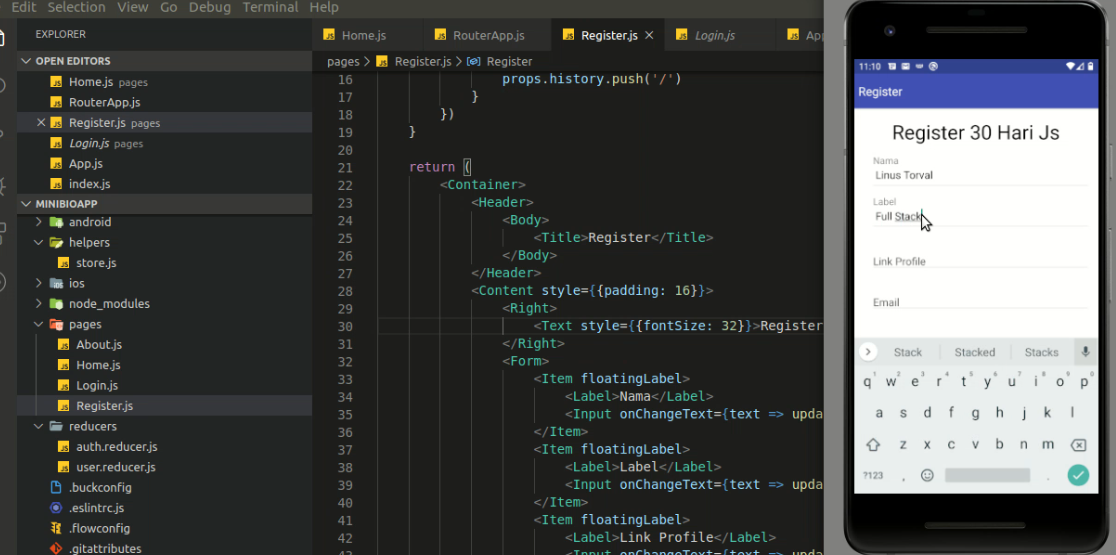
Hasil akan seperti berikut.