 asrul.dev
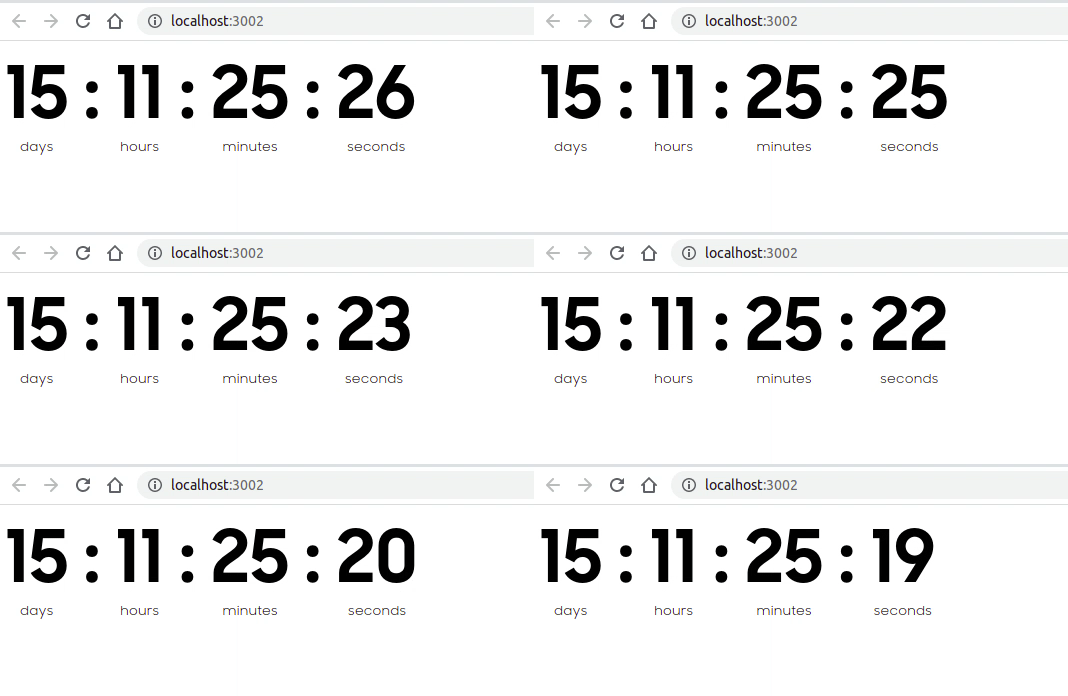
Perusahaan-perusahaan besar biasanya sudah mengumumkan sesuatu kepada publik satu bulan sebelum launching, atau bahkan lebih awal. Pengumuman tersebut dapat dibuat dalam berbagai bentuk, seperti video, gambar, hingga countdown timer.
Countdown timer juga sering digunakan untuk menyambut pergantian tahun, misalnya menghitung mundur menuju tahun baru. Selain itu, countdown dapat digunakan untuk berbagai kebutuhan lainnya, seperti promosi, event, launching produk, hingga ucapan ulang tahun.
Pada artikel kali ini saya akan membahas bagaimana cara membuat countdown timer menggunakan JavaScript.
Membuat Struktur HTML
Pertama, siapkan struktur HTML untuk menampilkan countdown timer seperti berikut:
<div class="countdown">
  <div class="time">
    <span id="days">00</span>
    <span>days</span>
  </div>

  <div class="semicolon">:</div>

  <div class="time">
    <span id="hours">00</span>
    <span>hours</span>
  </div>

  <div class="semicolon">:</div>

  <div class="time">
    <span id="minutes">00</span>
    <span>minutes</span>
  </div>

  <div class="semicolon">:</div>

  <div class="time">
    <span id="seconds">00</span>
    <span>seconds</span>
  </div>
</div>
Pada struktur HTML di atas terdapat beberapa elemen yang memiliki id, yaitu days, hours, minutes, dan seconds.
ID tersebut nantinya digunakan oleh JavaScript untuk mengubah nilai countdown secara otomatis setiap detik.
Untuk melakukan perubahan tersebut, kita dapat memanfaatkan DOM (Document Object Model) pada JavaScript.
Membuat Countdown dengan JavaScript
Berikut kode JavaScript yang digunakan:
function getCounter() {
  const countDownDate = new Date("Aug 11, 2021 22:00:00").getTime();

  const countdown = setInterval(function () {
    const now = new Date().getTime();
    const distance = countDownDate - now;

    const days = Math.floor(distance / (1000 * 60 * 60 * 24));
    const hours = Math.floor(
      (distance % (1000 * 60 * 60 * 24)) / (1000 * 60 * 60)
    );
    const minutes = Math.floor(
      (distance % (1000 * 60 * 60)) / (1000 * 60)
    );
    const seconds = Math.floor(
      (distance % (1000 * 60)) / 1000
    );

    const textDays = document.getElementById("days");
    const textHours = document.getElementById("hours");
    const textMinutes = document.getElementById("minutes");
    const textSeconds = document.getElementById("seconds");

    if (distance < 0) {
      clearInterval(countdown);

      textDays.textContent = "00";
      textHours.textContent = "00";
      textMinutes.textContent = "00";
      textSeconds.textContent = "00";

      return;
    }

    textDays.textContent = days < 10 ? `0${days}` : days;
    textHours.textContent = hours < 10 ? `0${hours}` : hours;
    textMinutes.textContent = minutes < 10 ? `0${minutes}` : minutes;
    textSeconds.textContent = seconds < 10 ? `0${seconds}` : seconds;
  }, 1000);
}

getCounter();
Pada kode di atas, kita terlebih dahulu menentukan tanggal dan waktu yang menjadi target countdown:
const countDownDate = new Date("Aug 11, 2021 22:00:00").getTime();Kemudian, setInterval() digunakan untuk menjalankan fungsi setiap satu detik.
const countdown = setInterval(function () {
  // kode countdown
}, 1000);
Nilai 1000 berarti fungsi tersebut akan dijalankan setiap 1000 milidetik atau 1 detik.
Selanjutnya kita mendapatkan waktu saat ini:
const now = new Date().getTime();Kemudian selisih antara waktu target dan waktu sekarang dihitung:
const distance = countDownDate - now;Nilai distance tersebut kemudian dikonversi menjadi hari, jam, menit, dan detik.
Untuk mendapatkan jumlah hari:
const days = Math.floor(distance / (1000 * 60 * 60 * 24));Untuk mendapatkan jumlah jam:
const hours = Math.floor(
  (distance % (1000 * 60 * 60 * 24)) / (1000 * 60 * 60)
);
Untuk mendapatkan jumlah menit:
const minutes = Math.floor(
  (distance % (1000 * 60 * 60)) / (1000 * 60)
);
Dan untuk mendapatkan jumlah detik:
const seconds = Math.floor(
  (distance % (1000 * 60)) / 1000
);
Setelah mendapatkan nilainya, kita mengambil elemen HTML menggunakan document.getElementById().
const textDays = document.getElementById("days");
const textHours = document.getElementById("hours");
const textMinutes = document.getElementById("minutes");
const textSeconds = document.getElementById("seconds");
Kemudian nilainya diperbarui menggunakan textContent:
textDays.textContent = days < 10 ? `0${days}` : days;
textHours.textContent = hours < 10 ? `0${hours}` : hours;
textMinutes.textContent = minutes < 10 ? `0${minutes}` : minutes;
textSeconds.textContent = seconds < 10 ? `0${seconds}` : seconds;
Jika countdown sudah mencapai waktu target, interval dihentikan menggunakan clearInterval() dan semua nilai dikembalikan menjadi 00.
if (distance < 0) {
  clearInterval(countdown);

  textDays.textContent = "00";
  textHours.textContent = "00";
  textMinutes.textContent = "00";
  textSeconds.textContent = "00";

  return;
}
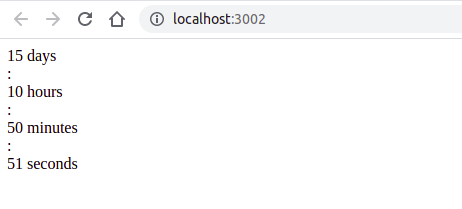
Hasilnya akan seperti berikut:
Menambahkan CSS
Selanjutnya agar countdown terlihat lebih rapi, kita dapat menambahkan sedikit styling menggunakan CSS.
.countdown {
  margin-bottom: 40px;
  display: flex;
  align-items: flex-start;
  justify-content: flex-start;
}

.countdown .time {
  display: flex;
  flex-direction: column;
  align-items: center;
}

.countdown .time:not(:last-child) {
  margin-right: 16px;
}

.countdown .time > span:first-child,
.countdown .semicolon {
  font-family: "Samsung Sharp Sans", sans-serif;
  font-style: normal;
  font-weight: bold;
  letter-spacing: 0.3px;
}

.countdown .time > span:first-child {
  font-size: 72px;
  line-height: 91px;
}

.countdown .time > span:last-child {
  font-family: "Samsung Sharp Sans", sans-serif;
  font-size: 12px;
  line-height: 15px;
  text-align: center;
  letter-spacing: 0.3px;
}

.countdown .semicolon {
  margin-right: 16px;
  font-size: 72px;
  line-height: 91px;
}

@media only screen and (max-width: 1024px) {
  .countdown {
    justify-content: center;
  }

  .countdown .time > span:first-child,
  .countdown .semicolon {
    font-size: 40px;
    line-height: 50px;
  }
}
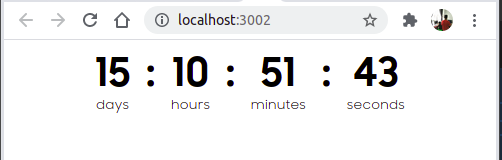
Dengan CSS tersebut, tampilan countdown menjadi lebih rapi dan dapat menyesuaikan ukuran layar.
Kode Lengkap
Berikut kode lengkap countdown timer yang dapat langsung digunakan:
<!DOCTYPE html>
<html lang="en">

<head>
  <meta charset="UTF-8" />

  <meta
    name="viewport"
    content="width=device-width, initial-scale=1"
  />

  <title>Countdown Timer</title>

  <link
    href="//fonts.cdnfonts.com/css/samsung-sharp-sans"
    rel="stylesheet"
  />

  <style>
    .countdown {
      margin-bottom: 40px;
      display: flex;
      align-items: flex-start;
      justify-content: flex-start;
    }

    .countdown .time {
      display: flex;
      flex-direction: column;
      align-items: center;
    }

    .countdown .time:not(:last-child) {
      margin-right: 16px;
    }

    .countdown .time > span:first-child,
    .countdown .semicolon {
      font-family: "Samsung Sharp Sans", sans-serif;
      font-style: normal;
      font-weight: bold;
      letter-spacing: 0.3px;
    }

    .countdown .time > span:first-child {
      font-size: 72px;
      line-height: 91px;
    }

    .countdown .time > span:last-child {
      font-family: "Samsung Sharp Sans", sans-serif;
      font-size: 12px;
      line-height: 15px;
      text-align: center;
      letter-spacing: 0.3px;
    }

    .countdown .semicolon {
      margin-right: 16px;
      font-size: 72px;
      line-height: 91px;
    }

    @media only screen and (max-width: 1024px) {
      .countdown {
        justify-content: center;
      }

      .countdown .time > span:first-child,
      .countdown .semicolon {
        font-size: 40px;
        line-height: 50px;
      }
    }
  </style>
</head>

<body>
  <div class="countdown">
    <div class="time">
      <span id="days">00</span>
      <span>days</span>
    </div>

    <div class="semicolon">:</div>

    <div class="time">
      <span id="hours">00</span>
      <span>hours</span>
    </div>

    <div class="semicolon">:</div>

    <div class="time">
      <span id="minutes">00</span>
      <span>minutes</span>
    </div>

    <div class="semicolon">:</div>

    <div class="time">
      <span id="seconds">00</span>
      <span>seconds</span>
    </div>
  </div>

  <script>
    function getCounter() {
      const countDownDate = new Date(
        "Aug 11, 2021 22:00:00"
      ).getTime();

      const countdown = setInterval(function () {
        const now = new Date().getTime();
        const distance = countDownDate - now;

        const days = Math.floor(
          distance / (1000 * 60 * 60 * 24)
        );

        const hours = Math.floor(
          (distance % (1000 * 60 * 60 * 24)) /
            (1000 * 60 * 60)
        );

        const minutes = Math.floor(
          (distance % (1000 * 60 * 60)) /
            (1000 * 60)
        );

        const seconds = Math.floor(
          (distance % (1000 * 60)) / 1000
        );

        const textDays = document.getElementById("days");
        const textHours = document.getElementById("hours");
        const textMinutes = document.getElementById("minutes");
        const textSeconds = document.getElementById("seconds");

        if (distance < 0) {
          clearInterval(countdown);

          textDays.textContent = "00";
          textHours.textContent = "00";
          textMinutes.textContent = "00";
          textSeconds.textContent = "00";

          return;
        }

        textDays.textContent =
          days < 10 ? `0${days}` : days;

        textHours.textContent =
          hours < 10 ? `0${hours}` : hours;

        textMinutes.textContent =
          minutes < 10 ? `0${minutes}` : minutes;

        textSeconds.textContent =
          seconds < 10 ? `0${seconds}` : seconds;
      }, 1000);
    }

    getCounter();
  </script>
</body>

</html>
Dengan kode di atas, kita sudah memiliki countdown timer sederhana menggunakan HTML, CSS, dan JavaScript.
Countdown seperti ini dapat dikembangkan lebih lanjut untuk berbagai kebutuhan, misalnya countdown launching produk, event, promo, pergantian tahun, atau halaman coming soon.